Stay tune we are working on a great experience for you.

Join our exclusive FREE webinar!
Industry Drug Abuse & Compliance
With Ali Cooper, CUBEX® Senior Director of Corporate Accounts.
Tuesday, 11/18, 2025 at 11:00 am PT | 12:00 pm MST | 1:00 pm CST | 2:00 pm EST


Stay tune we are working on a great experience for you.
Join our exclusive FREE webinar!
Industry Drug Abuse & Compliance
With Ali Cooper, CUBEX® Senior Director of Corporate Accounts.
Tuesday, 11/18, 2025 at 11:00 am PT | 12:00 pm MST | 1:00 pm CST | 2:00 pm EST


CUBEX x MWI Animal Health Order Integration
CUBEX x MWI Animal Health Order Integration
CUBEX connects with MWI Animal Health to help veterinary teams streamline supplier ordering from CUBEX to the customer’s MWI cart. With this integration, purchase requests can move from CUBEX into a customer-specific MWI cart, where teams can review the order, complete checkout, and receive supported order updates back into CUBEX after purchase.
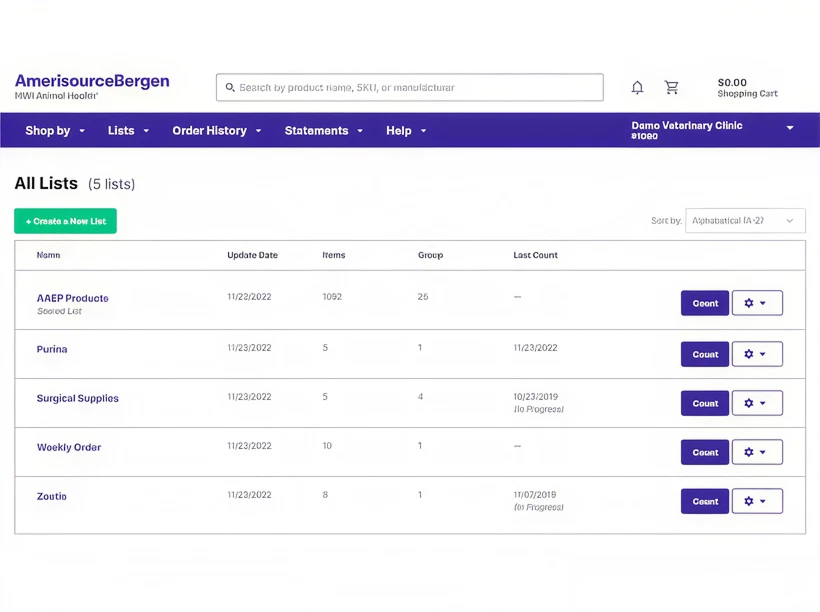
What is MWI Animal Health?
MWI Animal Health, a Cencora company, is an animal health distributor serving companion animal, equine, livestock, and production animal markets.
MWI provides pharmaceuticals, medical supplies, equipment, inventory solutions, pharmacy services, and operational support tools for veterinary organizations and animal producers.
For CUBEX customers, MWI serves as a supplier ordering and fulfillment partner that can help create a more connected purchasing workflow.
How the CUBEX + MWI Animal Health Order Integration Works
The CUBEX + MWI integration helps move purchase requests from CUBEX into the customer-specific MWI cart for review and checkout. Workflow may include:

Creation of Cubex purchase request based on the customer’s ordering setup

The purchase request is sent to the customer-specific MWI cart

The customer reviews the cart and completes checkout

Supported order response details can return to CUBEX

Returned details may include updated order quantity and last price paid, where supported
Key Benefits for Veterinary Hospitals

Reduces duplicate entry between CUBEX purchase requests and MWI ordering
Gives teams a clearer path from reorder need to supplier checkout
Supports scheduled Auto PO workflows from CUBEX
Helps keep purchasing activity aligned between CUBEX and MWI
Supports COGS alignment by updating last price paid in CUBEX after the order is received in CUBEX
Creates a more connected supplier ordering experience for veterinary purchasing teams
Key Benefits for Veterinary Hospitals


Features Supported in This Integration
The MWI integration supports a connected supplier ordering workflow between CUBEX and MWI. Key supported areas include:
Features Supported in This Integration
The MWI integration supports a connected supplier ordering workflow between CUBEX and MWI. Key supported areas include:
Scheduled purchase request submission from CUBEX
Customer-specific MWI cart review and checkout
Supported order response back to CUBEX
Updated order quantity visibility, where supported
Last price paid visibility after order receipt in CUBEX, where supported
MWI purchasing alignment with CUBEX ordering workflows
Who This Integration Is Best For
This integration is best for:
Who This Integration Is Best For
This integration is best for:
Purchasing and ordering technicians
MWI customers
Veterinary teams using CUBEX purchase request workflows
Hospitals using scheduled Auto PO workflows
Teams that want MWI purchasing activity better aligned with CUBEX ordering workflows
Setup & Configuration Requirements
Getting started with the CUBEX + MWI integration begins with making sure the customer’s MWI account, shipping details, and CUBEX order setup are aligned. At a high level, setup includes:
Setup & Configuration Requirements
Getting started with the CUBEX + MWI integration begins with making sure the customer’s MWI account, shipping details, and CUBEX order setup are aligned. At a high level, setup includes:
Confirming MWI account details
Confirming the customer ID or account number
Matching the registered MWI shipping address with the CUBEX order integration setup
Reviewing Auto PO preferences
Completing supplier order-interface setup in MyCubex
Validating the customer-specific MWI cart workflow
Confirming supported order response details back to CUBEX
About CUBEX Integrations
CUBEX integrations help veterinary teams connect everyday workflows across ordering, inventory, dispensing, reporting, and practice systems.
For supplier order integrations, CUBEX focuses on helping teams reduce duplicate work, streamline purchase request workflows, and improve alignment between CUBEX ordering activity and supplier purchasing platforms.
Available functionality depends on customer setup, supplier configuration, partner workflow, and supported data exchange.
Frequently Asked Questions

The CUBEX + MWI Animal Health integration is a supplier order integration. CUBEX sends purchase request information to the customer-specific MWI cart, and supported order details can return to CUBEX after checkout.
Yes. CUBEX sends the purchase request to the customer-specific MWI cart, where the customer can review the cart and complete checkout through MWI website.
Supported order response details can return to CUBEX after checkout, including updated order quantity, removal of catalog items on back-order from purchase request lists.
Where supported, the last price paid is updated in CUBEX after the order is received in the CUBEX Solution.
Important setup details include MWI account information, customer ID or account number, registered shipping address alignment between MWI and the CUBEX order integration setup, Auto PO preferences, supplier order-interface setup, cart workflow validation, and supported order response validation.
This is primarily a supplier order integration. The CUBEX + MWI workflow supports medications and supplies, excluding Schedule II medications at this time.
Get Started With CUBEX + MWI Animal Health Order Integration
Ready to connect CUBEX purchase requests with MWI ordering? Talk with CUBEX about setup requirements and integration readiness.
.jpg)